← All articles

· Ian Qvist

Facebook style auto-complete textbox in ASP.net

You might have seen the crispy AJAX enabled auto-complete list when entering friends into a textbox. I was especially intrigued by the “Compose Message – To:” textbox. You enter a part of a name and almost instantly a list of names popup. Adding a name is as simple as selecting it from the list and it gets added to the textbox.
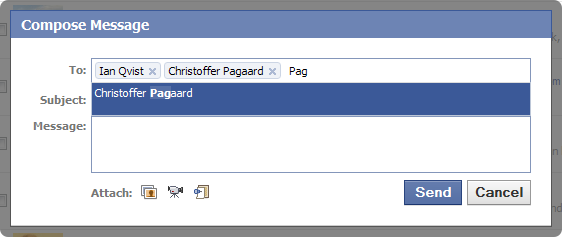
ComposeMessage

I started to identify the different parts of this functionality:

  • Labels inside textbox
  • Auto-completion on entering text
  • Growable textbox size
  • Highlighting of results
  • Close button on labels
  • Many more…

It looked like a daunting task, so I decided to search for an already made solution instead of making one myself. I came across an Ajax Control Toolkit issue that requested this functionality and even a jQuery plugin mentioned on Stack Overflow. Seemed like a lot of people mentioned this functionality, but nothing really appealed to me until I found TextboxList on DevThought.com.

It immediately caught my attention since it had a working demo that was exactly what I wanted. The greatest thing about TextboxList is that it is simple and very extensible, so I started my journey to create a To: field like the one from Facebook.

ASP.net implementation

I’m working in ASP.net with C# and the demo provided by DevThought.com was PHP only. Since I have a past of PHP, I decided to quickly take a look at their demo and create a ASP.net clone.

The only thing I did was to convert the auto-completion to C#. Everything else has just been taken from the original demo and fitted into a simple web site project. You can download the source code here:

Download TextboxList ASP.net Demo

From the original discussion

22 archived Blogger comments. This archive is read-only.

Unknown
Hi, the link seems to be broken.
Anonymous
Hi, your implementation is very good, thanks for it.. But you should check this control (fully customizable auto complete control for ASP.NET): http://www.simp.lified.com/ControlDemo.aspx
eks
hey thanks a lot for the project. that's very helpful for me. but I was wondering whether you can implement this by jQuery also. since I'm a newbie, I cannot do it myself.
Selçuk Yazar
Hi, How can we add new items in this text box ? for example new friend . I mean i wannt dynamically adding new items on list thanks in advance Selçuk
Anonymous
great work. But when we add this to a content page it is not working. Anything that we need to change?
Genbox
When you add it to a content page, the ID of the textbox is no longer "form_tags_input". One layer down (inside one content page) it will be "ctl00_ContentPlaceHolder1_form_tags_input". A concatenation of the content placeholder ID and the textbox ID.
Anonymous
thanks Genbox. I referred it as var txtform_tags_input = '<%= form_tags_input.ClientID %>'; & it worked. I have one more problem now. In the project it is all working fine. But when I publish it, text box is not listing anything. It just displays 'Please wait..'. Can you suggest anything?
Genbox
I sounds like it can't reach the web service. You should try debugging with some web tools for your browser. I use Web Developer Toolbar and Firebug. Take a look here for more tools for Firefox: http://amiworks.co.in/talk/11-best-web-developer-tools-for-firefox-and-internet-explorer/ - Ian Qvist
Anonymous
Thanks for the reply. Not able to figure out what is reason. If the project is of type website, it works when it is published. But when it is project it doesn't work when it is published. My application is of type project. Any idea?
Anonymous
Hi Ian, Can you please help me. I am not able to figure out why after publishing the web application, the text box is not listing. Basically, GetNameJson.aspx page is not loading when we start typing. Before publish, it all works fine. Thanks in advance
Genbox
I'm not sure why that happens. I've only tested it using web sites. It is concept code, so you might have to do some adjustments in order to use it in web projects or with newer .net versions.
Anonymous
Thanks. I will check it
Nanthakumar.T
Great post.!
Nanthakumar.T
hi all try to submit(post) the same form but selected textboxlist value is not showing after submit. i want to Preserve textboxlist value after postback.. i am using asp.net application.. what can i do?
Nanthakumar.T
I solved above problem using given smarttextbox concept. http://wayofspark.com/projects/smarttextbox/
Anonymous
hi there! great work and it is free. really appreciated it. one question: why are there 4 parameters within each item of the returned JsonArray? jsonArray[i] = new string[] { i.ToString(), names[i], null, html }; i didnt get the point to have a null 3rd parm there.
Sachin
How to restrict to enter one value only which can be either the existing value or new value entered by user
sparklets
thanks alot ,thats awesome please can you do it with webservices ? so that we can have it on the fly from database , this for the projects where data is large and connected with db
Genbox
You can hook it up to any datasource you want. However, you should take a look at this: https://autocompletecontrol.codeplex.com/
Anonymous
i was not able to use it with web services please any help
Anonymous
hi great work , but when i put same code in my project there is problem. GetNameJson.aspx.cs call multiple times and no result... So Please help me. rathin27@hotmail.com
Attiqe ur Rehman
Hi, How about if I want to add some values from the list progamatically, and TextBox should only contain unique members. Thanks, Attiqe